
الهه کمالی
September 2, 2026
Manual Call Point (MCP)
What is a Manual Call Point?
Types of Manual Call Points by Wiring Method
Types of Manual Call Points by Activation Method
Push Button or Break Glass Call Points
Pull Station
Dual Action Call Point
Installation Guidelines
Resetting a Manual Call Point
Color-Coding of Manual Call Points
Leading Brands
Conclusion: Direct Purchasing from Qpket
الهه کمالی
A manual call point is one of the essential devices used in a fire alarm system, designed for manual activation. In this article from Qpket, we will explore the features, operating principles, types, and other key technical points regarding manual call points.
What is a Manual Call Point?
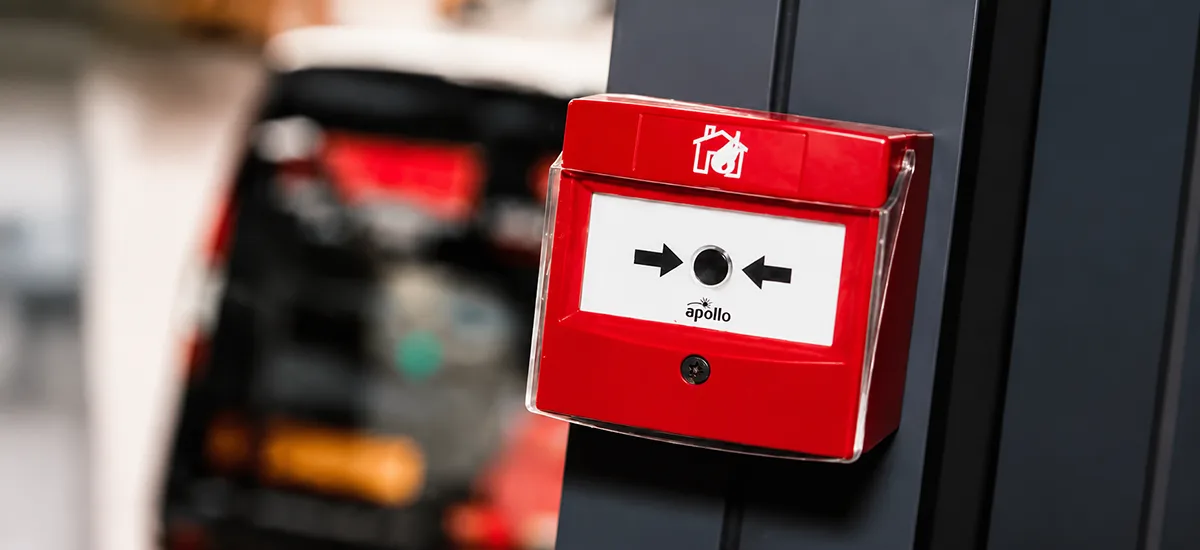
A Manual Call Point (MCP) is a device that allows for the manual activation of a fire alarm system. These devices are typically housed in small red enclosures and are installed in public areas or near emergency exits within a building.
The primary function of an MCP is to allow individuals who detect a fire before the automatic detection system to manually trigger the alarm sounders and initiate safety protocols by pressing or activating the unit.
Types of Manual Call Points by Wiring Method
Generally, manual call points are categorized into two types based on their wiring configuration:
- Addressable Manual Call Points
- Conventional Manual Call Points
Addressable MCPs, along with other devices in the system, are installed using a loop wiring configuration. In this system, each call point has a unique address; when triggered, the central control panel can identify the exact location of the fire.
Conversely, conventional MCPs are wired using a zoning method. Several devices are placed on a common circuit, and the control panel only indicates the relevant zone. Consequently, the exact location of the activated MCP is not pinpointed, only the general area of the fire can be identified.
Types of Manual Call Points by Activation Method
Based on the activation mechanism, MCPs are classified into three categories:
- Push Button or Break Glass Call Points
- Pull Stations
- Dual Action Call Points
Each is described in detail below.
Push Button or Break Glass Call Points
These are the most common call points used in fire alarm systems. They require the user to press a button or break a glass element. These models feature a transparent glass or plastic cover; once the center is pressed or struck, a fire signal is transmitted, and the alarms are activated.
Depending on their reset capability, these units are categorized as non-resettable, resettable, or those featuring a key-switch reset.
Pull Station
These devices are activated by pulling a lever or handle, unlike push-button models that require pressing or breaking. Pull stations are typically resettable, allowing them to be returned to their initial state after the incident is resolved.
Dual Action Call Point
Dual Action call points require two sequential operations for activation. These devices combine features of both push and pull models: the user must first press a primary button and then pull a lever to trigger the alarm. This design minimizes the risk of accidental or unintended activation, effectively reducing false alarms.
Installation Guidelines
According to fire department standards for fire protection systems, at least one manual call point is required in proximity to automatic detectors or sprinkler system flow switches. Important considerations for installation include:
- MCPs should be installed near exit doors on every floor.
- The distance from the door should be 1.5 meters. For exit doors wider than 12 meters, a call point must be provided within 1.5 meters of each side of the door.
- The mounting height should be between 1.0 and 1.2 meters from the finished floor to the center of the MCP.
- The horizontal travel distance from any point on a floor to reach an MCP should not exceed 45 meters. If the architectural layout is uncertain, this distance is reduced to 30 meters.
- The maximum horizontal travel distance must be restricted to 25 meters (or 30 meters if the layout is uncertain) in the following two scenarios:
- Buildings occupied by individuals with mobility impairments.
- Buildings used for handling or storing materials with high flammability or rapid-fire spread.
Resetting a Manual Call Point
Once the environment is confirmed safe, follow these steps to reset the device:
- Open the Housing: Unlock the cover or housing. Depending on the model, this may require a special key or a simple lock mechanism.
- Activate the Reset Mechanism: Once opened, you will see a switch, button, or lever. Operate this mechanism according to the manufacturer’s instructions to reset the alarm. Note that these details vary by manufacturer; refer to the technical manual or consult your system administrator if necessary.
- Close the Housing: After the reset is complete, secure the cover properly to protect the internal components from dust and damage.
Color-Coding of Manual Call Points
Call points are manufactured in various colors, each serving a specific purpose:
- Red: Standard for fire alarm systems and manual fire activation.
- Blue: Used for gas suppression systems (e.g., in server rooms or areas equipped with FM200 or CO₂ systems) to trigger gas discharge.
- Yellow: Used for specialized alarms or specific conditions, such as Emergency Stop switches.
- Green: Located near exits for Emergency Door Release purposes.
- White or Black: Used for custom applications or auxiliary systems; these are not common in standard fire alarm systems.
Leading Brands
Some of the most prominent brands for manual call points include:
- Apollo
- Syncoln
- Hochiki
- Notifier
- Teletek
- C-TEC
- Esser
- Fulleon
- Siemens
- E2S
- Edwards
- Zitex
- Protec
- Sense
- Inim
All products from the aforementioned brands are available on the Qpket.
Conclusion: Direct Purchasing from Qpket
In this article, we have covered the critical aspects and importance of manual call points. To inquire about the pricing of various models, simply register on the Qpket, select your desired products, and submit your inquiry. You may also upload your project’s equipment list directly through the request submission section.